Main—Container Check Digit Calculator

Container Check Digit Calculator

Check one container number or a whole list against ISO 6346, calculate missing check digits and start tracking in one click.

Check container numbers

Validate numbers and add missing check digits.

You can paste a column from Excel

Results will appear here

Check one number or a whole list. Each number gets one of four statuses:

Check passed

The number is correct. Nothing was changed.

Check digit added

You entered 10 characters. We calculated the 11th — the check digit.

Check digit replaced

The last digit didn't match, so we replaced it. The error may be elsewhere too.

Invalid format

The number doesn't match the format. It won't be sent to tracking.

How is a container check digit calculated?
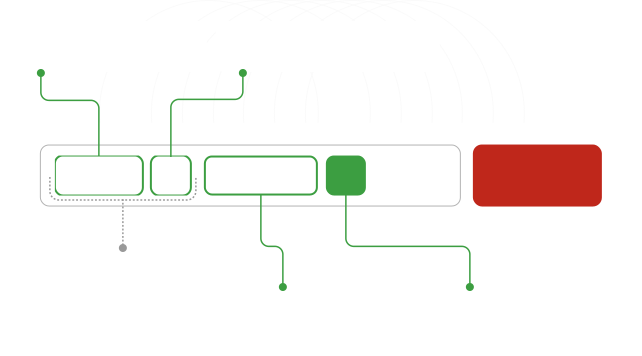
Three-letter owner code registered with BIC

Equipment category identifier ("U" indicates a freight container)

Unique serial number assigned to the container

Check digit used to validate the container number

ABCU1234567Prefix CodeStart Tracking
What Is a Container Check Digit?

The final digit of a container number is a check digit, calculated from the first 10 characters using ISO 6346. It helps detect typing errors but does not confirm that the container exists.

How to Calculate Container Check Digits

Convert letters to ISO 6346 values. Multiply the first 10 character values by 1, 2, 4, 8, 16, 32, 64, 128, 256 and 512, from left to right. Add the results. The remainder after division by 11 is the check digit; replace a remainder of 10 with 0.

F.A.Q.

A number fails when its format is incorrect: the owner code must be 3 letters, the equipment category U, J or Z, and the serial number 6 digits. If you enter 10 characters, we calculate the check digit. If the last digit doesn't match, we replace it with the calculated one — check the full number against your source, because the error may be in other characters too.

It is the final digit of the container identification number. On the physical container, it is typically shown in a box after the six-digit serial number. In documents and tracking systems, it may appear as the last character without a box.

Yes. The check digit is 0 when the calculation leaves a remainder of 0 or 10 after division by 11. A final zero is not, by itself, an error.

Not always. Different inputs can produce the same check digit, so a match cannot rule out every typing error. It also does not confirm that the number was assigned to a container or that a tracking provider has records for it. If a number passes but returns no tracking result, confirm it against the original marking or documents and check the carrier or forwarder.

Not necessarily. The prefix identifies the registered owner or principal operator, which may be a leasing company rather than the carrier moving your cargo — check your shipment documents for the carrier. The prefix is also part of the calculation: recalculate the check digit whenever it changes, even if the result may stay the same.

Yes. Paste the numbers into the same field, one per line, and click Check. Each number gets its own status. You can copy the results as a table. The Track button opens an empty tracking form, where you need to enter your numbers again.
Contact TimeToCargo team

Get started with TimeToCargo

Create an account for self-service access, or contact our team to discuss custom requirements